

掲名テーマの固定ページにサイドバーを追加
Really-Simpleはシンプルで高速化を体現できるテーマですが、固定ページだけサイドバーを表示出来ないのが大きな欠点です。ここでは固定ページに、子テーマを作ってサイドバーを表示する方法をまとめました。なお、記述内容は内向けサイトでの確認内容です
1.まずローカルで必要なファイルを用意します
really-child名でフォルダを作成し、そのフォルダの中に3つのファイルを作成します
・CSSファイルの作成は、ファイル名を”style.css”名で下記内容を記述します
/*
Theme Name: really-child
Version: 1.1
Template: really-simple
*/
・”function.php”名で下記の内容を記述します
<?php
add_action( ‘wp_enqueue_scripts’, ‘theme_enqueue_styles’ );
function theme_enqueue_styles() {
wp_enqueue_style( ‘parent-style’, get_template_directory_uri() . ‘/style.css’ );
wp_enqueue_style( ‘child-style’, get_stylesheet_directory_uri() . ‘/style.css’, array(‘parent-style’)
);
}
?>
・”page.php”名で下記の内容を記述します
<?php
/**
* The template for displaying all pages
*
* This is the template that displays all pages by default.
* Please note that this is the WordPress construct of pages
* and that other ‘pages’ on your WordPress site may use a
* different template.
*
* @link https://developer.wordpress.org/themes/basics/template-hierarchy/
*
* @package Really Simple
*/
get_header(); ?>
<?php
// Start the Loop
while ( have_posts() ) : the_post();
// Content page
get_template_part( ‘template-parts/content’, ‘page’ );
// If comments are open or we have at least one comment, load up the comment template.
if ( comments_open() || get_comments_number() ) :
comments_template();
endif;
endwhile; // End of the loop.
?>
</main><!– #main –>
<aside class=”widget-area”>
<?php get_sidebar(); ?>
</aside><!– .widget-area –>
</div><!– #primary –>
<?php
get_footer();
2.3つのファイルが入ったフォルダを表示する場所で
フォルダ名really-childを選択し、Zip圧縮ファイルを作成します。下図参照
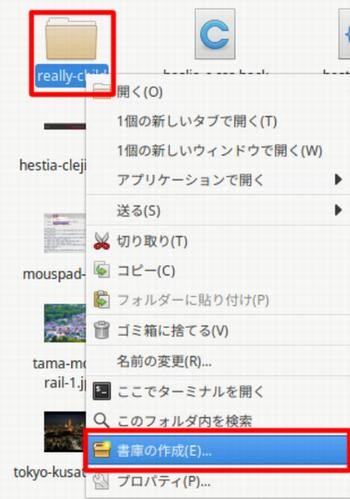
3.ワードプレスのreally-simpleのサイトにログインします
ログイン後、テーマの追加で、テーマのアップロードボタンをクリックし、上記のZipファイルを指定し、アップロードしたら、サイトをインストール・有効化を実行します。really-childが有効となり、固定ページにサイドバーが表示される様になりました